HTML Documentation
Oval-Healthcare HTML Template
Thank you for purchasing our theme!
Please take the time to read this documentation before use our theme.

Preparation
In this section, we will learn about Gulp, Sass/Scss and Twig template engine.
But if you don't want to use these tools, make manual changes to the dist/landing/*.html files and dist/assets/css/*.css files.
Gulp.js Installation - Preparation
The first thing to prepare is Gulp.js, "A toolkit to automate & enhance your workflow".
This toolkit is very helpful for automatically compiling scss files into .css and twig templates into .html, when we modify the templates.
You need to follow the steps based on https://gulpjs.com/docs/en/getting-started/quick-start.
Literally you need to check for node, npm, and npx. If they are not installed, follow the instructions here.
node --version
npm --version
npx --version

In the next step you have to Install the gulp command line utility.
npm install --global gulp-cli

After the installation has been successful, make sure you can check the version of installed Gulp CLI on your machine.
gulp --version

Sass Installation - Preparation
Sass is a professional grade CSS extension language. In this case we use .scss syntax.
To install this toolkit, you need to follow the steps based on https://sass-lang.com/install, make sure to use Command Line version.
Before you start, you need to check for node, npm, and npx as in Gulp.js Installation.
Next, install Sass using npm by running : npm install -g sass.

You can check installed sass version by running : sass --version.

About Twig.js - Preparation
Twig.js is a pure JavaScript implementation of the Twig PHP templating language (https://twig.symfony.com/).
To compile Twig.js template with gulp.js we can use gulp-twig package.
This package is also installed when running npm install in your project directory.
Install Depedencies - Preparation
There is a pakage.json file in your project directory, which contains a list of packages needed in the project.
Open CMD or Terminal and change directory to your project, for example : cd /designspace/project/directory/

Run npm install in your project directory.

Depedencies installation only needs once, then immediately run the gulp command.
Run Gulp - Preparation
After all of dependencies has been installed, run gulp command in your project directory.
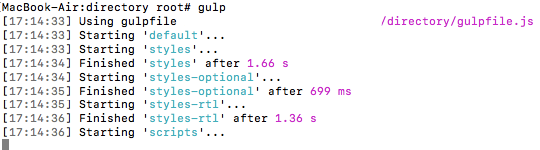
Gulp.js will watch the changes in your scss and twig files,
then automatically compiling scss files into .css and twig templates into .html.